Skip to content

Free on Google Play and the App Store

MerryWise: the Christmas gift list & budget planner that keeps the surprise.

Plan every gift and keep the whole Christmas on budget, from wrapping to travel. Track each present from idea to given, stay fair between the kids, plan together with your household and never spoil a surprise. Your past years are always free.

  • 1,000+downloads

Free with ads. Optional Holiday Pass $14.99/year or Family Pass $24.99/year, each after a 7-day free trial for new subscribers.

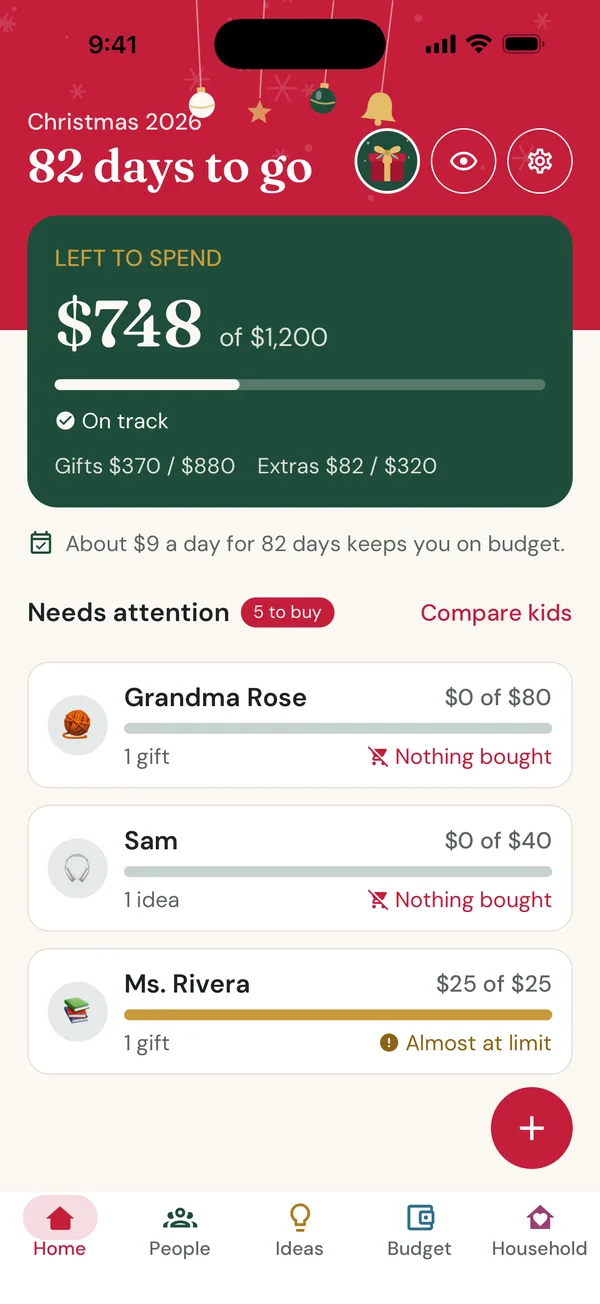
MerryWise home screen: Christmas 2026, 82 days to go, $748 left to spend of $1,200, and a Needs attention list
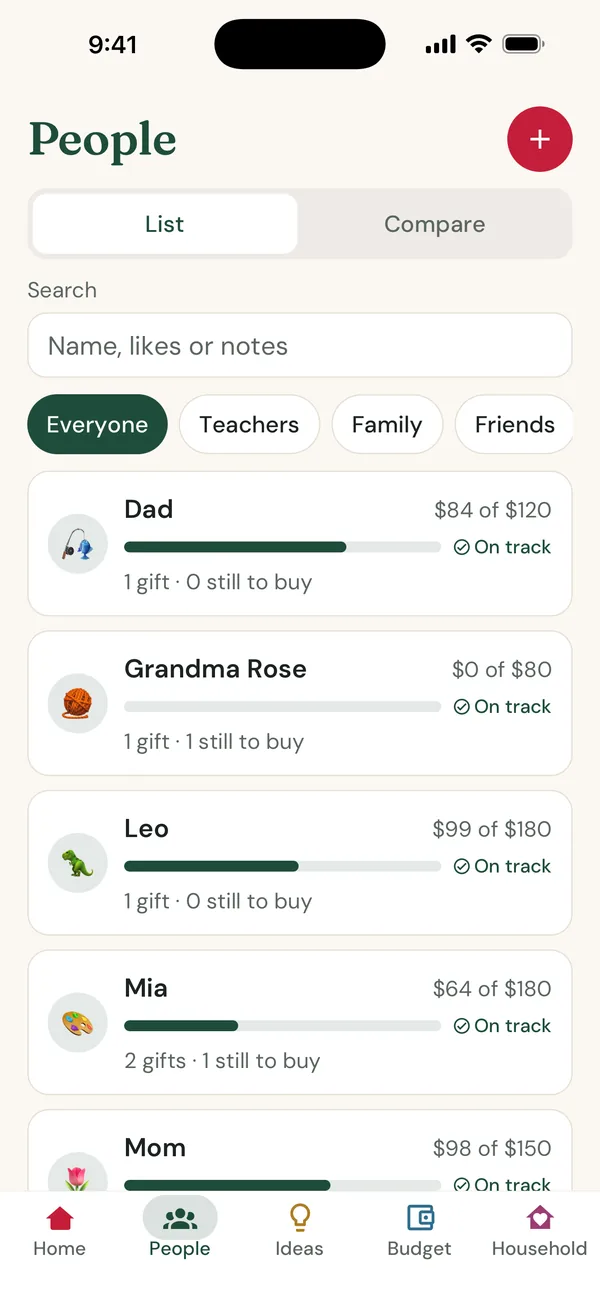
MerryWise People list with Dad, Grandma Rose, Leo and Mia, each with a budget bar and gifts still to buy
  • Free to start

    No sign-up, unlimited people and gifts

  • 55 languages

    Follows your phone, switch any time

  • Never sold

    Your lists are not shared with advertisers

  • Spoiler-safe

    No gift names on the lock screen or widgets, unless you choose

  • Past years free

    Your history never goes behind a paywall

At a glance

What is MerryWise?

MerryWise is a Christmas gift planner app that combines a gift list, a gift tracker and a holiday budget planner. It replaces the notes, screenshots and spreadsheets most families juggle in December with one calm place for every person, every gift and every dollar, and it keeps every past Christmas for next year.

Platform
Android and iPhone
Price
Free with ads. Holiday Pass $14.99/year or Family Pass $24.99/year for the whole household, each after a 7-day free trial for new subscribers
Languages
55, including Arabic, Hebrew, Persian and Urdu
Category
Lifestyle: gift list, gift tracker, budget planner
Account
Not needed to start; sign in to back up, share or buy a Pass
Developer
Next App Factory LLC

How it works

Christmas planned in three steps

Most people set up their first list in a few minutes. No account, no forms.

  1. 1

    Set one budget and add your people

    Type one number for the whole Christmas. MerryWise suggests a split between gifts and extras, then you add the people you buy for and group them: Family, Kids, Friends, Work, Teachers.

  2. 2

    Save ideas the moment you see them

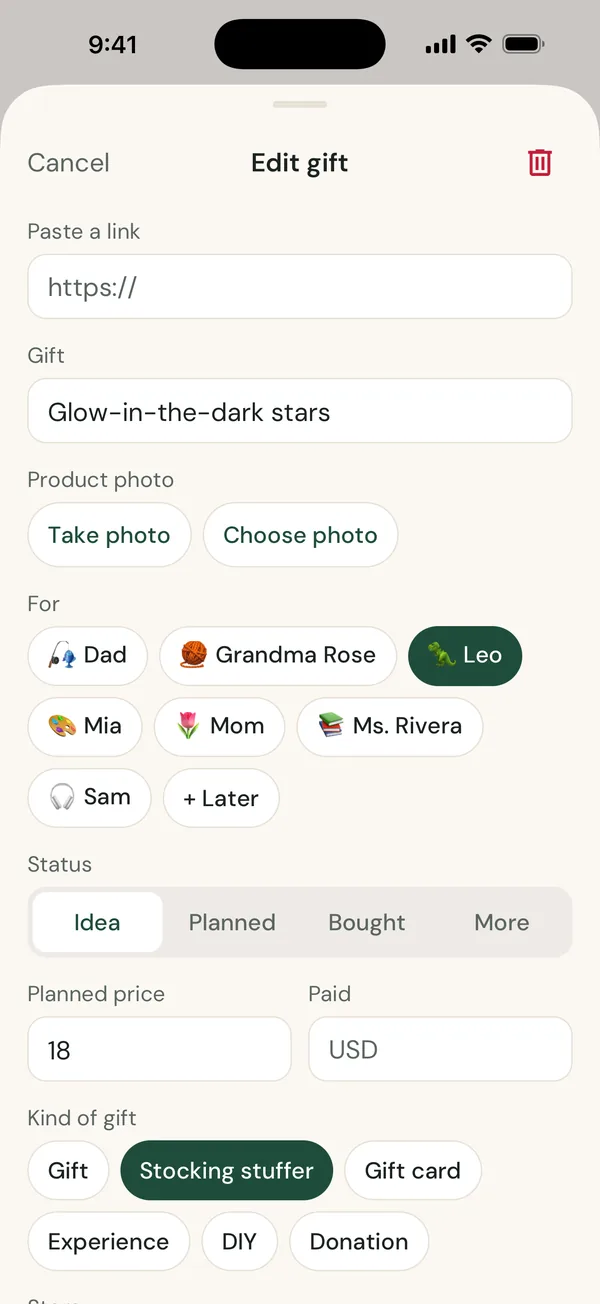
    Paste a product link and the photo, title and price fill in, share from any shopping app, or snap a photo in the store. Ideas can wait in an inbox until you decide who they are for.

  3. 3

    Move every gift to “given”

    Mark gifts planned, bought, wrapped and given. Before you buy, see what it does to the person’s budget and the season. Check fairness between the kids, and know where everything is hidden.

Features

Everything your Christmas spreadsheet did, and a lot it couldn’t

Gift tracker

Every gift, every person, from idea to given

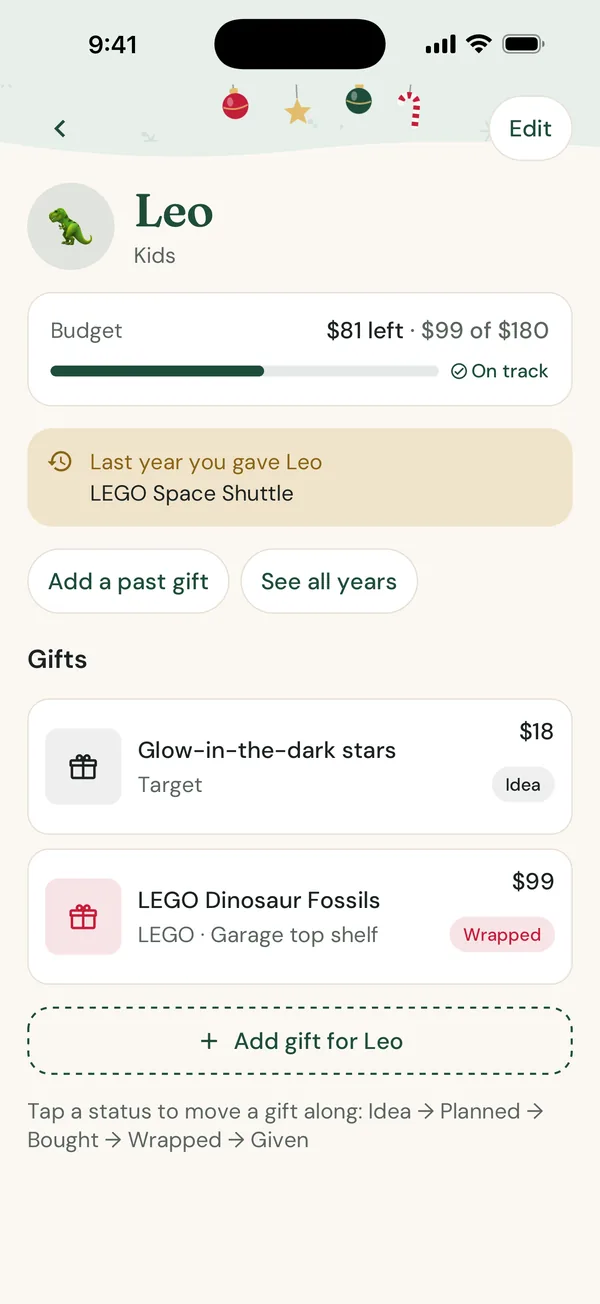
Each person gets a card with their budget, what is already bought and what is still to buy. Every gift moves through the same simple steps, so a single glance tells you what is left to do.

  • Statuses: idea, planned, bought, wrapped, given
  • Hiding places, so you can find every gift on Christmas Eve
  • Order numbers, tracking and expected delivery dates
  • Sizes, likes, dislikes and notes for each person
MerryWise person screen for Leo showing a budget of $180, last year's gift, and two gifts with Idea and Wrapped statuses

Christmas budget planner

One budget for the whole season, not just the gifts

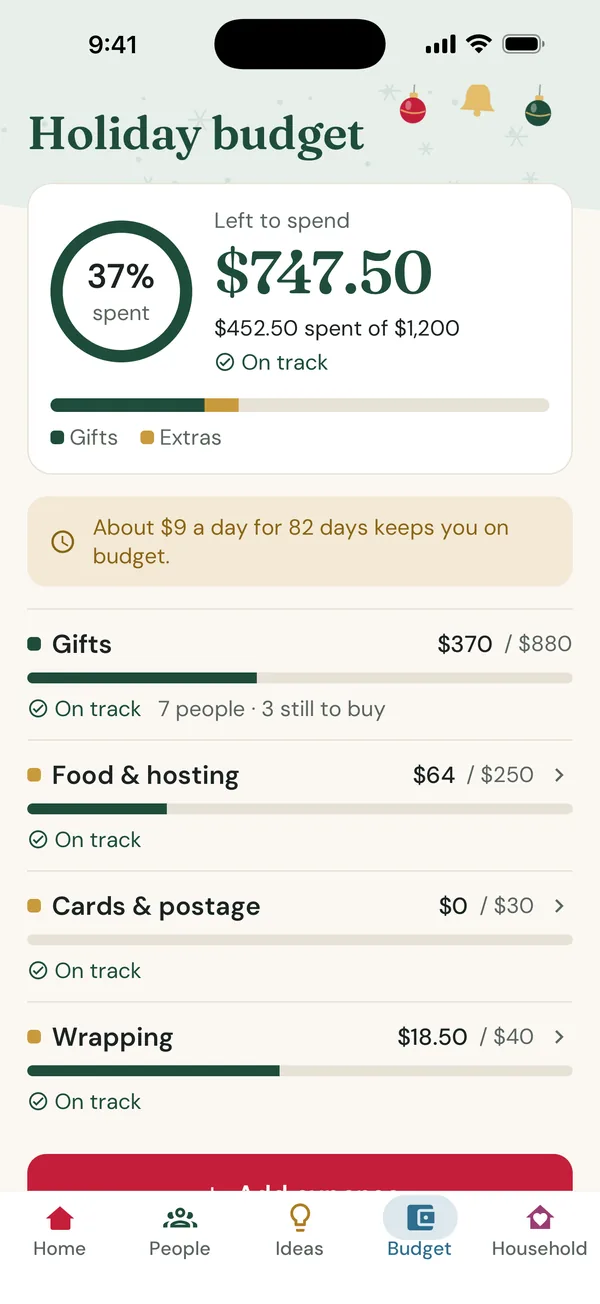
Christmas costs more than presents. Set one total and MerryWise splits it into gifts and the extras that sneak up on you: food and hosting, cards and postage, wrapping, stockings, decorations, travel, shipping and donations. The biggest number on the home screen is what you have left to spend.

  • See the impact on the person and the season before you mark a gift bought
  • Per-person and per-category limits with gentle, non-blocking warnings
  • A daily pace, such as “About $9 a day for 82 days keeps you on budget”
  • A brainstorm mode that hides totals while you collect ideas
MerryWise holiday budget screen showing $747.50 left to spend of $1,200, with gifts, food and hosting, cards and wrapping categories

Fair between the kids

Compare the kids side by side, by count and by amount

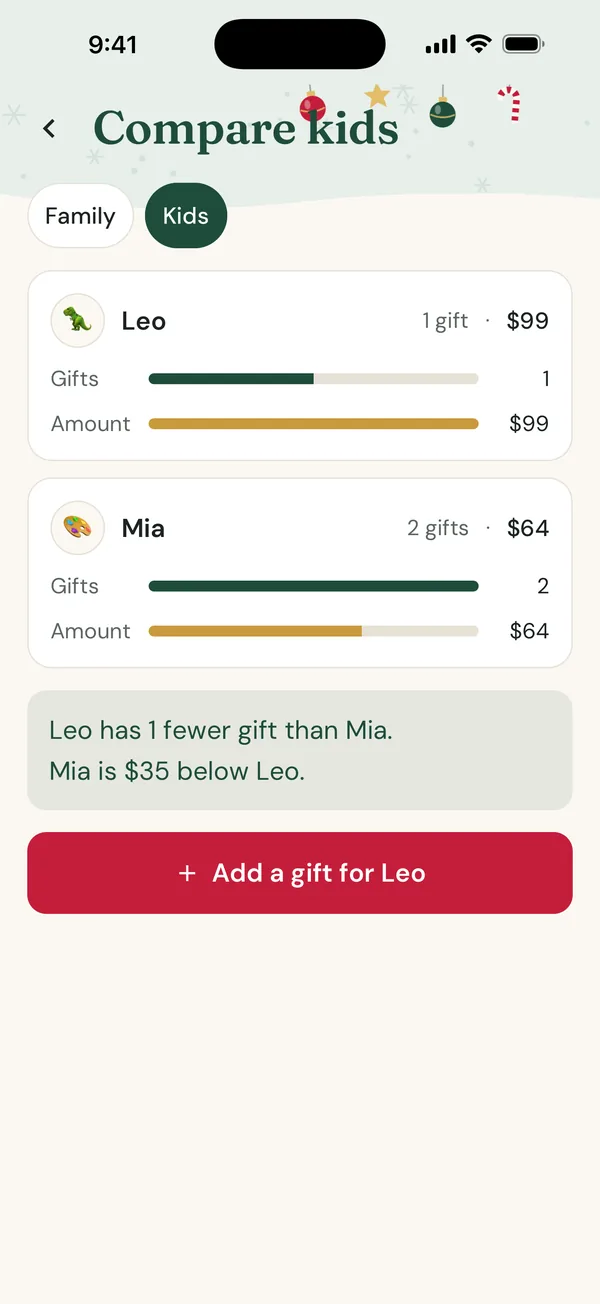
Children count presents; parents count dollars. The Compare view shows both for any group, with a calm note such as “Leo has 1 fewer gift than Mia. Mia is $35 below Leo.” There are no rankings and no winners, just a quick check before you buy one more thing.

  • Works for any group: Kids, Family, grandchildren, nieces and nephews
  • Shows gifts committed and planned, so you can rebalance in time
  • One tap from the comparison to add a gift for whoever is behind
MerryWise Compare kids screen showing Leo with 1 gift worth $99 and Mia with 2 gifts worth $64

Plan together

Share the plan with your household, keep the surprise

Included with the Family Pass

Plan Christmas with your partner or family from your own phones. Everyone sees the shared people, gifts and budget. Gifts you protect with Surprise Shield stay yours alone: everyone else in the household, including the person they are for, sees only an anonymous “Reserved” amount, never the gift, its photo or its receipt, and the shared budget still adds up.

  • Up to 6 people join with a short invite code
  • A shared activity feed that never mentions shielded gifts
  • Members can leave any time and take their Surprise Shield gifts with them
  • One Family Pass covers the whole household

Spoiler-safe by design

Nobody peeks, not even the lock screen

Kids pick up phones, and partners glance at notifications. MerryWise is built so that nothing gives the game away: lock the app with your fingerprint, face or device passcode, and every reminder and widget stays generic unless you choose otherwise.

  • Optional app lock that locks again after a minute in the background
  • Delivery, return and gift-day reminders that do not name the gift unless you turn on gift details
  • A home-screen countdown widget with days and budget left, no gift names

Secret Santa generator

Draw Secret Santa names in a minute

Organise a gift exchange for the family, friends or the office without a website, sign-ups or emails. Add the names, set who must not draw whom, add a price limit if you like, and draw. Then pass the phone around for private reveals, or send each person their own result.

  • Nobody draws themselves or someone they are excluded from
  • Exclusions for couples, siblings or anyone else
  • Re-draw if someone joins or drops out
  • The draw happens on your phone and is not uploaded

Receipts & returns

Never lose a gift receipt again

Included with the Holiday Pass

Attach a photo of the receipt to the gift, note whether a gift receipt went in the box, and set the return-by date. MerryWise reminds you three days and one day before the window closes, and after Christmas a returns list keeps every deadline in order.

  • Receipt photos stored with the gift they belong to
  • Return-by reminders that never say what the gift was
  • Refunds come off what you spent, so the budget stays honest

Your history, free forever

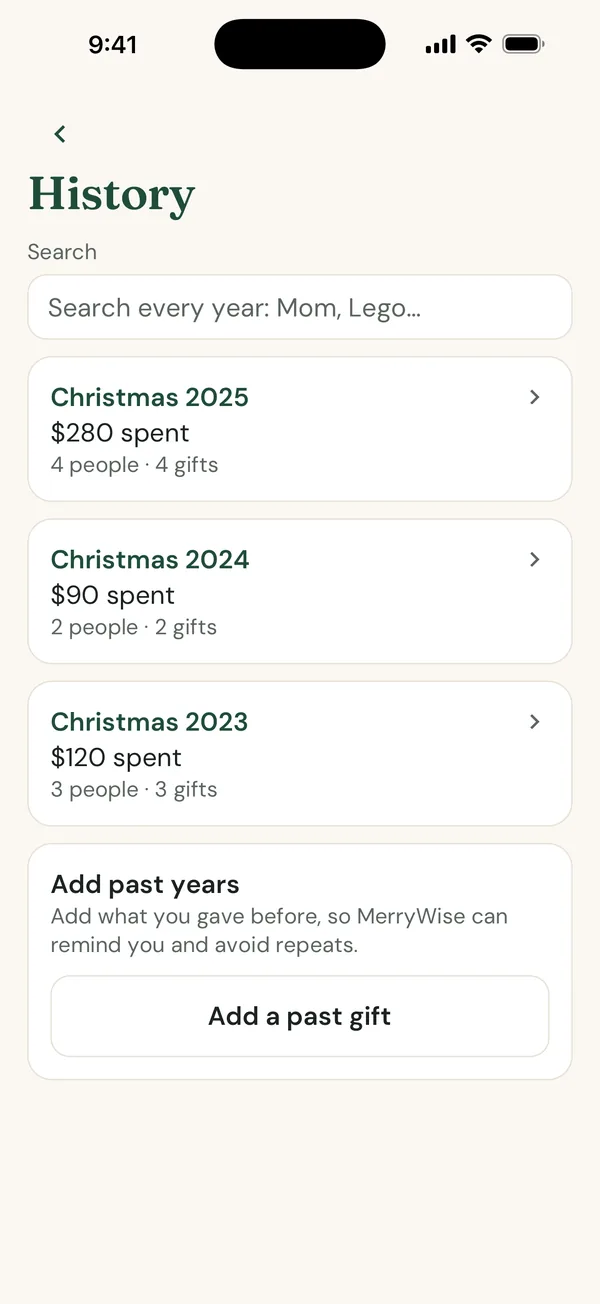
Every past Christmas, searchable

MerryWise keeps each year: what you spent against the budget, who you bought for and what they got. Search your last 10 Christmases for “Mom” or “Lego”, see “Last year” on each person, and get a friendly warning before you give someone a similar gift twice. Your past years never go behind a paywall.

  • Add what you gave in earlier years so the history helps from day one
  • Carry people and budgets over to next Christmas in a few taps
  • Export a season to CSV, or all your data, whenever you like
MerryWise History screen listing Christmas 2025, 2024 and 2023 with amounts spent and a search box for every year

And the small things that make December easier

  • Countdown to the big day

    Days to Christmas on the home screen and widget, with the default gift day set for your country.

  • Extra gift days

    Add Christmas Eve, St. Nicholas, Hanukkah or Three Kings when your family gives on more than one day (Holiday Pass).

  • Needs attention

    A short list of people with nothing bought yet or close to their limit, sorted to the top.

  • After Christmas

    Once the presents are open: returns by deadline, gift cards you received, a thank-you list and a look back at your season.

  • Groups that fit your life

    Family, Kids, Friends, Work and Teachers, or your own. A person can be in several groups.

  • Backup and new phones

    Your lists are backed up to your account. Sign in and your people, gifts, budgets and past years come back on a new phone.

Who it’s for

Made for anyone who buys a lot of gifts in December

  • Parents

    Keep the kids’ gifts balanced, track the stocking stuffers and remember where everything is hidden.

  • Couples and households

    Plan from two phones with one budget, while each of you keeps the other’s gift a surprise.

  • Big families

    Grandparents, cousins, in-laws and teachers in one list, grouped so nobody gets forgotten.

  • Offices and friend groups

    Draw a Secret Santa with a price limit and exclusions, and reveal it in the room or by message.

  • Budget-conscious shoppers

    See what is left before you buy, including the food, travel and wrapping most budgets forget.

  • Former spreadsheet planners

    Everything your spreadsheet tracked, plus photos, links, reminders and every past year, on your phone.

Pricing

Free to plan. A Pass when you want more.

The core of MerryWise is free, with no limit on people or gifts, and your past years are never paywalled. The Holiday Pass is a yearly subscription for you; the Family Pass covers your whole household and lets you plan together.

Free

$0

Everything you need to plan Christmas, with ads.

Holiday Pass

$14.99 / year

For you: no ads, receipts and return reminders, extra gift days and more answers from Ask Santa.

Starts with a 7-day free trial for new subscribers. Auto-renews yearly; cancel any time in Google Play.

Family Pass

$24.99 / year

Everything in the Holiday Pass for everyone in your household (up to 6 people), plus planning together with Surprise Shield.

Starts with a 7-day free trial for new subscribers. Auto-renews yearly; cancel any time in Google Play. Holiday Pass holders can upgrade in the app.

MerryWise Free compared with the Holiday Pass and the Family Pass
FeatureFreeHoliday PassFamily Pass
Unlimited people, gifts and budgetsIncludedIncludedIncluded
Whole-season budget with extrasIncludedIncludedIncluded
Fairness view for kids and groupsIncludedIncludedIncluded
Paste a link and share from any appIncludedIncludedIncluded
Secret Santa drawsIncludedIncludedIncluded
App lock and spoiler-safe remindersIncludedIncludedIncluded
Countdown widgetIncludedIncludedIncluded
Past years, search and repeat warningsIncludedIncludedIncluded
Backup, CSV and full data exportIncludedIncludedIncluded
AdsYesNo adsNo ads
Receipts and return remindersNot includedIncludedIncluded
Extra gift daysFirst dayIncludedIncluded
Answers from Ask Santa, the AI gift assistant25MoreMore
Covers everyone in the household (up to 6 people)Not includedNot includedIncluded
Plan together with Surprise ShieldNot includedNot includedIncluded

Prices are in US dollars and may vary by country and currency; Google Play shows your local price before you subscribe. If a Pass lapses, nothing is deleted or locked away.

Privacy

Your Christmas lists are yours

A gift list says a lot about a family. MerryWise is built so that it stays private: your lists are never sold and never shared with advertisers.

Read the privacy policy
  • No sign-up wall

    Start with a private anonymous account. Sign in when you want a backup on a new phone, a household or a Pass.

  • Nothing for advertisers

    Ads never receive your lists, names or gifts. Diagnostics never include gift titles or prices.

  • Surprise Shield is enforced

    Shielded gifts are protected on the server, not just hidden on screen.

  • Export or delete any time

    Export a season to CSV or all your data, or delete your account and data from Settings.

FAQ

Questions people ask about Christmas gift planning

What is MerryWise?

MerryWise is a Christmas gift list and holiday budget planner app. You add the people you buy for, save gift ideas, move each gift from idea to planned, bought, wrapped and given, and keep one budget for the whole season, including wrapping, cards, food, travel and décor. It is free to start, available on Google Play, and works in 55 languages.

What is the best app for Christmas gift lists?

The best Christmas gift list app is the one that replaces your notes and spreadsheet entirely: it should track every person and gift, show what you have spent against a budget, hide gifts from the people they are for, and keep past years so you do not repeat a present. MerryWise was built around exactly those jobs, adds a side-by-side fairness check for kids and a Secret Santa draw, and is free to start, so you can try it with your real list before deciding.

How do I keep track of Christmas gifts?

Keep one list per person and give every gift a status: idea, planned, bought, wrapped, given. Add the price as you buy, note where you hid it, and save order and tracking numbers for online orders. In MerryWise each gift moves through those statuses with a tap, so on December 23 you can filter for what is bought but not wrapped, or search a name to see every gift and its hiding place.

How much should I spend on Christmas gifts?

Spend what you can pay for in full by January without touching savings or a credit card balance you cannot clear. Start from one total for the season, set aside roughly a fifth to a third for extras such as wrapping, cards, food, travel and decorations, then divide the rest between the people on your list. Our guide "How to set a Christmas gift budget" walks through the numbers step by step.

Can my partner and I share a gift list without spoiling surprises?

Yes. With the Family Pass you can share one plan with your household (up to 6 people). Gifts you protect with Surprise Shield stay yours alone: everyone else in the household, including the person they are for, sees only an anonymous "Reserved" amount against the budget, never the gift, its photo or its receipt, while the shared budget stays correct.

Is MerryWise free?

Yes. MerryWise is free with ads and the free version has no limit on people, gifts or budgets. Your past years, the fairness view, Secret Santa draws and the spoiler-safe lock are all free. The optional Holiday Pass costs $14.99 per year and removes ads, adds receipts and return reminders, extra gift days and more answers from Ask Santa, just for you. The Family Pass costs $24.99 per year and gives all of that to everyone in your household, plus planning together. Both start with a 7-day free trial for new subscribers, and prices may vary by country and currency.

What do the Holiday Pass and the Family Pass include?

Both are auto-renewing yearly subscriptions with a 7-day free trial for new subscribers. The Holiday Pass ($14.99 per year) covers you: it removes all ads, adds receipt photos and return-by reminders, lets you add extra gift days such as Christmas Eve, St. Nicholas or Three Kings, and gives you more answers from Ask Santa, the in-app AI gift assistant. The Family Pass ($24.99 per year) gives everything in the Holiday Pass to everyone in your household (up to 6 people) and turns on planning together: shared people, gifts and budget, with Surprise Shield. You can upgrade from the Holiday Pass to the Family Pass in the app. If you bought the Holiday Pass before the Family Pass arrived, it keeps covering your household. If a Pass lapses, nothing is deleted or hidden.

Does MerryWise work on iPhone?

Yes. MerryWise is available on both the App Store and Google Play, and a household can plan together across iPhone and Android.

How does Secret Santa drawing work in MerryWise?

Add the participants, mark who must not draw whom (for example couples), optionally set a price limit, and tap draw. MerryWise guarantees nobody draws themselves or an excluded person. Reveal by passing the phone around, where each person taps their name and holds to see their match, or send each person their own result. Participants do not need the app, an account or an email address, and the draw stays on your phone.

How do I keep Christmas gifts fair between my kids?

Compare both the number of gifts and the amount spent, because kids notice the pile and parents notice the price. MerryWise shows the kids side by side by count and by amount, with gentle notes such as "Mia has 2 fewer gifts than Leo", so you can add a stocking stuffer or rebalance before you buy. It never ranks the children.

Is my data private?

Your lists are never sold and never shared with advertisers. Gift names, people and notes are not sent to ads or analytics. Notifications and widgets never show a gift name unless you turn that on, and you can lock the app with your fingerprint, face or device passcode. You can export your data or delete your account and data from Settings at any time. The privacy policy has the full details.

Do I need an account to use MerryWise?

No sign-up is needed to start: MerryWise creates a private anonymous account the first time you open it. Sign in with Google later (or Apple on iPhone) to restore your lists on a new phone, to create or join a household, or to buy a Pass.

Can I see what I gave in past years?

Yes, and it is free forever. MerryWise keeps every past Christmas, lets you search the last ten for a name or a gift such as "Mom" or "Lego", shows "Last year" on each person, and warns you before you give someone a similar gift twice. You can also add what you gave in earlier years so the history is useful from day one.

Which languages and currencies does MerryWise support?

MerryWise is available in 55 languages, including right-to-left Arabic, Hebrew, Persian and Urdu. It follows your phone's language by default and you can switch in Settings. Amounts use your local currency and number format.
Using the app already? See MerryWise support for help with backups, households and the Holiday and Family Passes.

Christmas, organized.

Start your gift list today. It is free, it takes a few minutes, and your future self on December 23 will thank you.